
Every certificate is recorded
The moment a certificate is issued, a record of it is created in our database. Nothing is generated that we cannot later confirm.
Course certificates, program certificates and language certificates all carry their own verification ID. Enter it below and we will confirm straight away whether it is genuine, and who it belongs to.
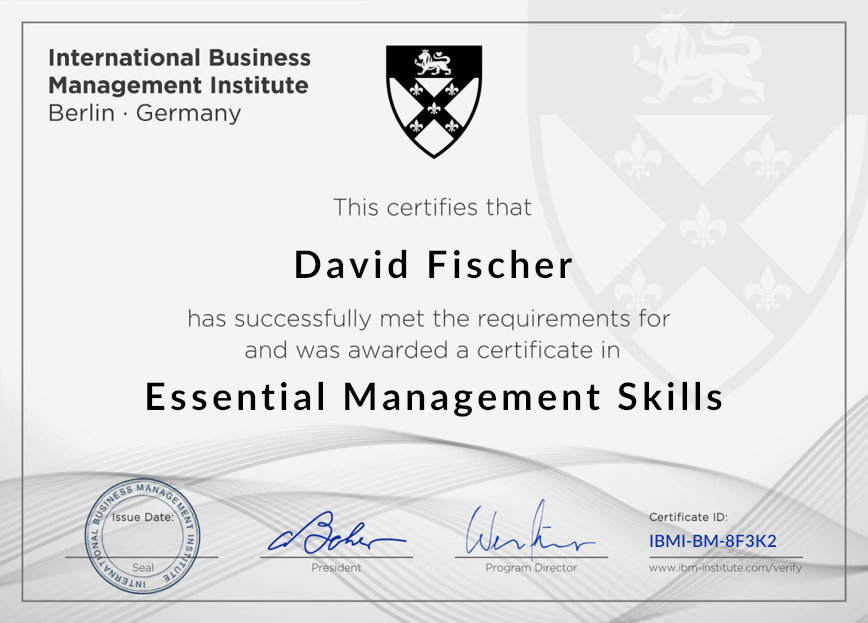
The ID is printed in the bottom-right corner of the certificate. Show me where
Every certificate we issue — course, program or language — carries an individual verification number in the bottom-right corner. It looks something like 1-234-456-789, and the dashes are part of it.
The moment a certificate is issued, a record of it is created in our database. Nothing is generated that we cannot later confirm.
If the ID matches a record, you will see the holder’s first name and last name, along with what the certificate is for — a course, a program or a language test. If there is no match, you will be told so.
There is no account to create, no form to submit and nothing to wait for. Employers and universities can check a certificate the moment they are handed one.
Almost always one of three small things:
You can search by the email address the certificate was issued to instead — the same box above accepts either.
And if it is your own certificate, you can download a fresh copy from My Certificates and read the ID straight off it.
Never. Once issued, a certificate stays valid indefinitely and its ID will always verify.
There is nothing to renew and no annual fee.
We have written a short guide that walks you through it, including where to put the certificate ID so anyone viewing your profile can check it.
Not a problem, and easily fixed. Update your name in Edit Account, then download the certificate again from My Certificates.
The new copy carries the corrected spelling, and the ID stays the same.
If a code will not validate, or if something about a certificate does not look right to you, please do let us know. We would far rather hear about it.
